- Published on
Claude Design from Anthropic Labs: How to Make It On-Brand With a brand-guidelines.md
Anthropic just announced Claude Design, a new experiment from Anthropic Labs that turns Claude into a design partner. Generate landing pages, marketing components, hero sections, and visual assets in a single Claude conversation, with iteration that actually feels like working with a designer instead of a slot machine.
It's the latest entrant in a category that's getting crowded fast. Google has Stitch and Pomelli. Vercel has v0. Figma has Make. And now Anthropic has Claude Design, with the same DNA that makes Claude one of the strongest models for front-end code and design taste.
But here's the thing every team rediscovers within ten minutes of using any of these tools: AI design output is only as on-brand as the brief you give it. Without your colours, your typography, your voice, your archetype, your ICPs, Claude Design will produce something tasteful, modern, and competent, that looks like every other tasteful, modern, competent landing page on the internet.
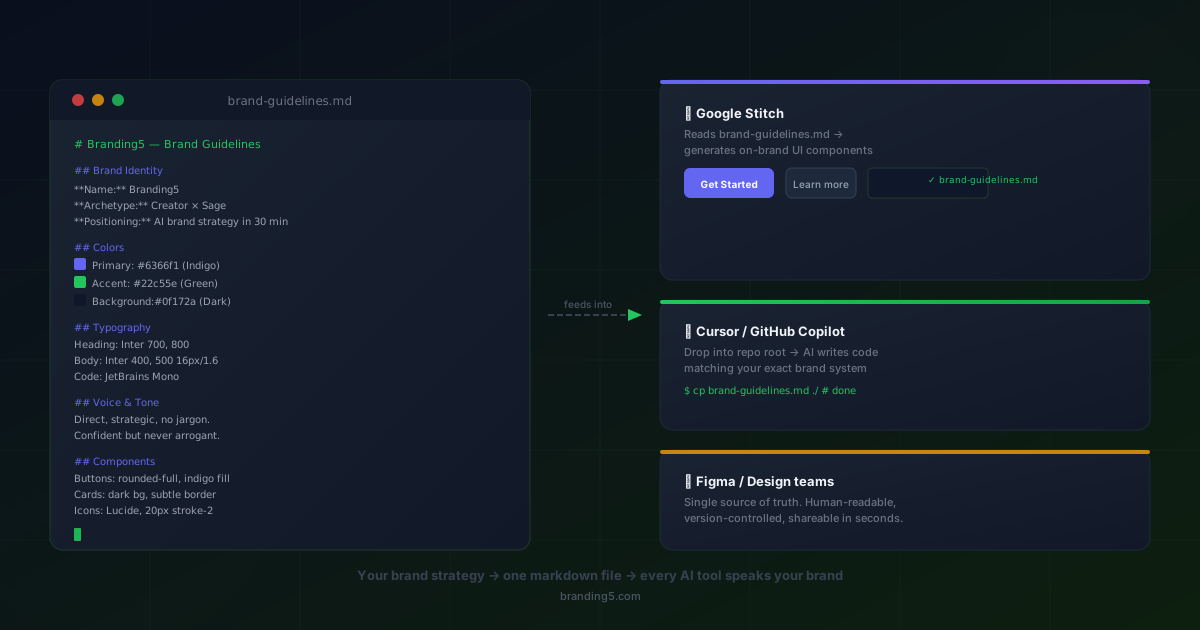
That's where a brand-guidelines.md (or DESIGN.md) file changes everything. Branding5 generates yours in one click from your brand strategy. Drop it into Claude Design and every output is on-brand from the first generation.
What is Claude Design?
Claude Design is part of Anthropic Labs, Anthropic's space for experimental products built on top of Claude. Where the standard Claude chat is a general-purpose assistant, Claude Design is purpose-built for the design and front-end loop:
- Describe what you want to build, in plain language
- Claude generates a working design with real, editable components
- Iterate by asking for changes the way you'd talk to a designer ("make the hero quieter", "swap the testimonial section for a logo wall", "use a warmer palette")
- Export or hand off the result into your real codebase
It's the same underlying capability that has made Claude a favourite inside tools like Cursor, Lovable, and Bolt for shipping production UI, now wrapped in a dedicated design surface.
What makes Claude Design interesting isn't that it can produce a hero section. Most tools can do that now. It's that Claude is unusually good at three things designers actually care about:
- Visual taste. Claude tends to produce restrained, modern, hierarchy-respecting layouts by default. Less "AI slop", more "looks like a real product".
- Iterative reasoning. Ask it why a section is laid out the way it is and you get an answer that engages with the trade-offs. That makes refinement feel like a conversation, not a re-roll.
- Code-quality output. What Claude generates tends to be clean, semantic, and easy to drop into a real Next.js or Tailwind codebase, not a wall of inline styles.
In short: Claude Design is what happens when the model that's already doing your design work in Cursor gets a dedicated home with a designer's UI bolted on top.
The catch every AI design tool shares
Whether it's Claude Design, Stitch, Pomelli, v0, or Figma Make, they all share one structural weakness: they don't know your brand unless you tell them.
Out of the box, Claude has good design instincts. It knows what good UI looks like. It does not know:
- Your primary colour, your accent, your hover state, your destructive red
- Your typography stack, weights, and tracking
- Your border-radius personality (sharp? rounded? full pill?)
- Your spacing rhythm
- Your archetype (a Sage's hero section is very different from a Jester's)
- Your voice (do you say "Get started" or "Let's build something")
- Your ICP (a VP of Marketing scans differently than a Growth Lead)
- Your do's and don'ts ("no stock photos of people pointing at screens")
So you end up doing what every team does in the first week with one of these tools: re-explaining the brand. Every. Single. Prompt. "Use our blue, which is #2563eb, headings in Plus Jakarta Sans 800, body in Inter, rounded-full buttons, no exclamation marks…" It works, but it scales like garbage. New session, same brief. New teammate, same brief. New screen, same brief.
This is exactly the loop that the DESIGN.md / brand-guidelines.md format was created to kill, and it's the loop that makes Claude Design dramatically better when you feed it one.
Why brand-guidelines.md is the right input for Claude Design
brand-guidelines.md (sometimes called DESIGN.md, popularised by Google's design-md spec) is a plain-text Markdown file that captures your full brand system in a structure both humans and LLMs can parse natively. We've written about why it's the one file every AI tool needs to know your brand.
Markdown happens to be Claude's native habitat. Claude reads, writes, and reasons in Markdown by default. So when you hand Claude Design a brand-guidelines.md:
- It doesn't need OCR (PDF brand books are useless to LLMs)
- It doesn't need a plugin or special integration
- It doesn't need re-explaining at the start of every session
- It applies the constraints automatically across every component it generates
A Branding5-generated brand-guidelines.md doesn't just include the visual specs. It includes the brand strategy that should drive design decisions in the first place, the layer Pomelli's "Business DNA", v0's project settings, and most "upload your brand kit" flows quietly skip.
Here's what's inside a Branding5 file that Claude Design can actually use:
| Section | What Claude Design uses it for |
|---|---|
| Positioning statement | Picking the right hero promise and the right level of confidence in copy |
| Archetype (Sage, Jester, Hero, Caregiver, etc.) | Choosing imagery, density, tone, and rhythm of the page |
| ICPs | Tailoring headlines, objections, and CTAs to a specific reader |
| Voice and tone with do/don't examples | Matching your real voice instead of defaulting to AI-speak |
| Colour system with usage rules | Applying primary, accent, neutral, and semantic colours correctly |
| Typography hierarchy | Picking sizes, weights, tracking, and line-height per role |
| Spacing and radius tokens | Hitting your real "feel" (8px vs 4px base, sharp vs pill) |
| Component conventions (buttons, cards, forms) | Generating components you don't have to redesign on the way to prod |
| Do's and don'ts | Hard constraints Claude follows literally, every generation |
The depth matters because Claude's design output is uncannily strategic when you give it strategic input. Tell it your archetype is The Sage and your ICP is a non-technical VP of Marketing, and the hero section comes back understated, evidence-led, with a CTA that reads "See the data" instead of "Start your free trial!". Tell it nothing, and you get a generic "AI for X" page.
Using Claude Design with a brand-guidelines.md (the workflow)
The flow is short, but the order matters.
1. Generate your brand-guidelines.md in Branding5
Run your brand analysis in Branding5 (about 30 minutes from a blank state). Your dashboard exposes a one-click brand-guidelines.md export, structured in the design-md style and ready for any AI tool. It includes:
- YAML front matter with name, archetype, positioning, voice, colours, typography
- A full visual identity section (colours, typography, spacing, components)
- Brand voice with concrete do/don't copy examples
- Your ICPs as personas with pain points, language patterns, and objections
- Marketing copy patterns (headlines, CTAs, PAS structure)
If you've already finished a brand in Branding5, this is literally a single download.
2. Attach the file at the start of your Claude Design session
Open Claude Design and attach your brand-guidelines.md as the very first message in the session. Don't paste a summary, don't paraphrase. Give Claude the whole file. It's exactly the kind of structured Markdown context it's optimised to use.
A useful opening prompt:
Attached is our brand-guidelines.md. Use it as the source of truth for
every design decision in this session: colours, typography, spacing,
component conventions, voice, and tone. Match our archetype and
target ICP 1 unless I say otherwise. If anything in a future request
conflicts with the file, ask me before overriding it.
That last line is the underrated one. It turns Claude into a brand guardian instead of a yes-machine.
3. Prompt for outcomes, not styles
With the brief loaded, you stop describing how things should look and start describing what they should do. Examples:
- "Generate a hero section for ICP 1 (Growth Marketing Manager). Lead with the time-to-first-insight benefit. Single CTA, no secondary."
- "Build a 3-tier pricing section. Highlight the middle tier. Match the card and button conventions in the guidelines."
- "Write 5 alternative H1s in our voice for the same page. No exclamation marks. Lead with benefit, not feature."
The brand input is implicit because it's already in context. You're free to talk strategy and structure.
4. Iterate in brand-aware language
Because Claude Design has the file, you can correct it the way a creative director would, not the way a stylist would:
- "Too loud for a Sage archetype, dial back the gradients."
- "This headline would work for ICP 2, not ICP 1. Rewrite for the Growth Marketing Manager."
- "Buttons should be rounded-full per the guidelines, not rounded-md."
Each correction is a one-liner, not a full re-brief. That's the productivity unlock.
5. Hand off the output without a brand review pass
What Claude Design gives you back is already filtered through your brand. The "is this on brand?" review pass that normally eats a half-day after every AI-generated draft mostly disappears. You're reviewing for content and conversion, not for whether it looks like your company.
What this looks like vs. the alternative
To make the difference concrete, here's the same prompt run two ways:
Without a brand-guidelines.md:
"Generate a hero section for an analytics product."
You get something well-composed but anonymous: a gradient background, a generic "Unlock the power of your data" headline, a primary blue CTA, and a faux-dashboard mockup. It looks like every other AI-generated SaaS hero, because that's the median of the training distribution.
With a Branding5 brand-guidelines.md attached:
"Generate a hero section for an analytics product, targeting ICP 1."
Claude Design has your archetype (say, The Sage), your positioning ("the only analytics platform built for non-technical marketing teams"), your colour system, your type stack, and your voice. The output: a calm, evidence-led layout in your exact palette, with a headline like "See which campaigns drive revenue, in one click", your real Plus Jakarta Sans heading style, your rounded-full primary CTA in your hex blue, and a tone that matches the rest of your site.
Same model. Same prompt structure. Wildly different output, because the constraint is now embedded.
Where this fits in your stack
brand-guidelines.md is the universal currency, not the Claude-only one. The same file you give Claude Design also goes into:
- Cursor / Windsurf / Copilot in your repo root as
DESIGN.md(here's how to wire it up) - Google Stitch for UI generation in the Material/Web ecosystem
- v0, Bolt, Lovable as a project-level reference attached to every generation
- ChatGPT, Gemini, or Claude in regular chat mode for marketing copy, ad variations, and email
- Image-generation tools like FLUX or Midjourney for brand-aligned visuals (we cover that workflow in our Pomelli alternative guide)
You write your brand strategy once. You generate the file once. Every AI tool your team uses, including Claude Design, drinks from the same source. That's the actual structural change, not the individual tool launches.
The bigger pattern: Anthropic, Google, and the brand-guidelines layer
Step back from the product launches and the pattern is obvious. Google launched Stitch, then Pomelli. Anthropic launched Claude Design. Vercel has v0. Figma has Make. Every major AI lab and design platform is now shipping a native "describe it, get a design" surface.
Each of them quietly assumes you know your brand. None of them helps you define it. The "Business DNA" approaches that try (like Pomelli's website-scanning) end up replicating whatever inconsistencies are already on your site, rather than fixing them.
That's the gap Branding5 sits in. Not as another design generator, but as the strategic source of truth that all of these tools plug into. Your positioning, archetype, voice, ICPs, and visual system, captured in a single machine-readable file that Claude Design (and everything else) can read on first contact.
The teams who win the next 24 months aren't the ones who picked the right AI design tool. They're the ones who showed up to every AI design tool with a brand-guidelines.md already in hand.
Get your brand-guidelines.md for Claude Design
If you want Claude Design to feel like an extension of your team instead of an extension of the model's defaults, give it the brief it actually needs.
Generate your brand-guidelines.md in Branding5 →
Run your brand analysis once, download a design-md compliant brand-guidelines.md, and drop it into Claude Design, Cursor, Stitch, v0, and every other AI tool in your stack. One file, every tool, on-brand from the first prompt.
Frequently asked questions
What is Claude Design?
Claude Design is an experimental product from Anthropic Labs that turns Claude into a dedicated design and front-end partner. You describe what you want to build (a landing page, a hero section, a pricing block, a component) and Claude generates the design with editable, code-quality output you can iterate on in conversation. It's built on the same Claude models that power design and front-end work in tools like Cursor, Lovable, and Bolt, with a purpose-built design surface on top.
How is Claude Design different from Google Stitch or v0?
All three are AI-native design tools, but they sit in different ecosystems and have different strengths. Stitch is tightly integrated with Google's design-md format and Material conventions. v0 is closely coupled to the Vercel / shadcn / Next.js stack. Claude Design leans on Claude's design taste and its strong reasoning for iteration ("why did you lay it out that way?"). The good news: a brand-guidelines.md works in all three, so you can switch tools without rewriting your brand brief.
Do I need a special file format for Claude Design?
No. Claude Design reads plain Markdown natively, including the design-md / brand-guidelines.md format. You don't need a plugin, an integration, or a conversion step. Attach the file at the start of your session and Claude treats it as the source of truth for the rest of the conversation.
What's in a Branding5 brand-guidelines.md that Claude Design actually uses?
All of it: the YAML front matter (archetype, positioning, voice, colours, typography), the visual identity section (colour roles, type hierarchy, spacing, component conventions), the brand voice with do/don't examples, and your ICPs. Claude Design uses the strategic layer to pick the right tone and structure, and the visual layer to match your exact palette, type, and component personality. See our deeper breakdown of what goes inside.
Can I use the same file with Claude Design, Cursor, and Stitch?
Yes, that's the whole point of the format. brand-guidelines.md (or DESIGN.md) is plain Markdown, so it works with any LLM-powered tool: Claude Design, Cursor, Windsurf, GitHub Copilot, Stitch, v0, Bolt, Lovable, ChatGPT, Gemini, and any image-generation tool that accepts text context. One source of truth, every tool.
What if my brand evolves?
Re-run your analysis in Branding5 (or edit the file directly, it's just text), commit the new version, and the next session in Claude Design picks up the change instantly. No agency revision cycle, no PDF reissue, no Slack thread about which version is current.
Is Claude Design available everywhere?
Claude Design launched as an Anthropic Labs experiment, so availability and feature scope may evolve over time. Check the official Anthropic Labs announcement for the latest on access. Whatever the current footprint, your brand-guidelines.md is portable: if Claude Design isn't available in your region today, the same file works in every other AI design tool that is.
How long does it take to generate a brand-guidelines.md in Branding5?
About 30 minutes from a blank state to a full strategy and a downloadable brand-guidelines.md. If you've already completed a brand in Branding5, the file is one click away from your dashboard.
Make Claude Design feel like your designer, not a stranger's
Stop re-briefing Claude every session. Generate your brand-guidelines.md with Branding5's AI brand guidelines generator and give Claude Design the strategic and visual context it needs to be on-brand from the very first prompt.
See also:
- AI Brand Guidelines — a deeper dive into the format, with a live sample and the full list of compatible AI tools.
- Brand Guidelines Generator — the full brand book, exported as PDF, web report and Markdown.