- Published on
brand-guidelines.md: The One File Every AI Tool Needs to Know Your Brand
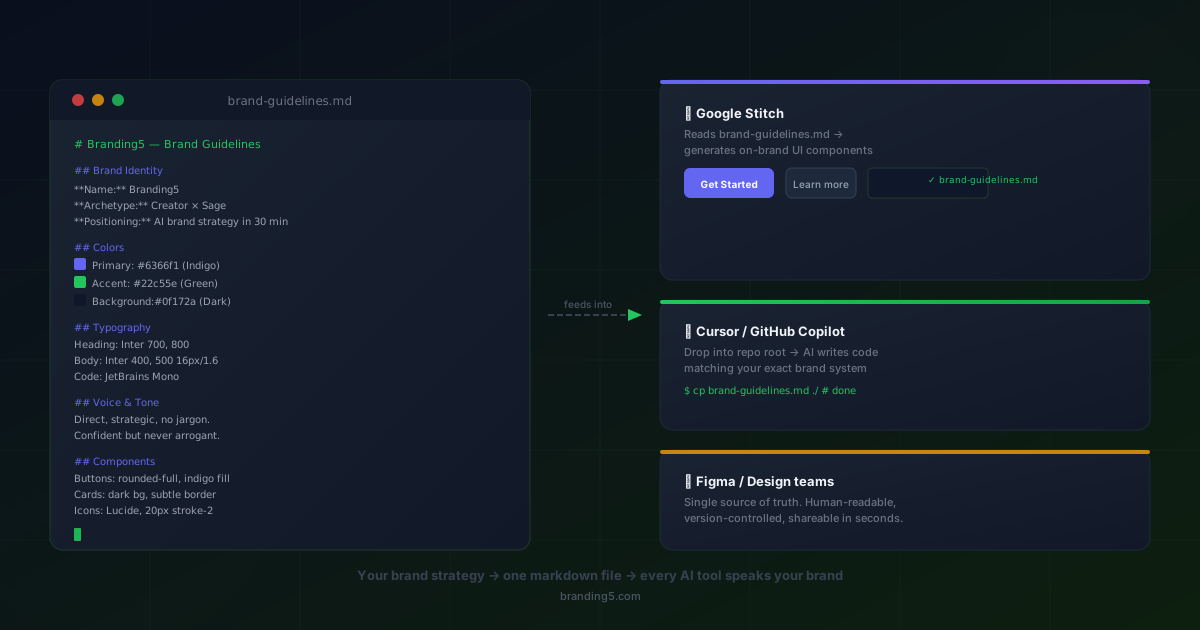
You've paid good money for brand guidelines. They're sitting in a 47-page PDF somewhere in Google Drive, the one your design agency delivered 18 months ago. Your developers have never opened it. Your AI tools can't open it. And every single time someone spins up a landing page in Cursor, drafts a marketing email with Claude, or scaffolds a component in v0, they start from zero: "What's our primary colour again? Is it Inter or Plus Jakarta Sans? Do we use rounded or sharp corners?"
That loop (explain the brand, hope it sticks, fix what doesn't) costs hours every week. Across a team, it costs thousands per month in rework alone.
Google's Stitch design-md format eliminates that loop. And Branding5's AI brand guidelines generator builds your complete brand-guidelines.md automatically. Download it in one click, drop it in your repo, and every AI tool your team touches instantly knows your brand.
What is design-md? (And why do people call it DESIGN.md?)
Design-md is a plain-text, Markdown-based specification for brand and design guidelines. Instead of a PDF that only humans can (theoretically) read, it's a structured .md file that both people and AI systems can parse, understand, and build from.
Google created the format as part of Stich, their AI-powered UI generation platform, with a simple premise: if you give an AI a well-structured description of your brand system, it can generate UI, write copy, and make design decisions that are already on-brand. No more repeating yourself every session.
Two names, one idea
Files written in this format go by two names:
DESIGN.md: the shorthand in developer communities. It sits alongsideREADME.mdandCONTRIBUTING.mdat the project root, and Cursor, Windsurf, and other AI coding tools look for it automatically.brand-guidelines.md: the name Branding5 uses, because the file contains far more than visual specs. It captures your positioning, archetypes, ICPs, voice, and strategy. The full brand system, not just colours and fonts.
Either name works. The format and the power are the same.
What goes inside a brand-guidelines.md
A complete file covers every layer of your brand, from strategy down to pixel-level specs. Here's what a Branding5-generated brand-guidelines.md looks like in practice:
# Acme Analytics

## Brand Foundation

- **Positioning:** The only analytics platform built for non-technical marketing teams
  who need enterprise-grade insights without the learning curve.
- **Archetype:** The Sage: wise, trustworthy, data-driven
- **Mission:** Make data literacy accessible to every marketer.
- **Values:** Clarity over complexity. Accuracy over speed. Empowerment over dependency.

## Ideal Customer Profiles

### ICP 1: Growth Marketing Manager

- 28–38, mid-market SaaS (50–500 employees)
- Frustrated by complex BI tools; needs dashboards they can build alone
- Language patterns: "actionable insights", "self-serve", "time-to-value"
- Key objection: "Will this replace our existing BI stack?"

### ICP 2: VP of Marketing

- 35–50, reports to CMO or CEO
- Cares about cross-channel attribution and board-ready reporting
- Buys on ROI proof and integration breadth

## Visual Identity

### Colors

| Role        | Hex       | Usage                                |
| ----------- | --------- | ------------------------------------ |
| Primary     | `#2563eb` | CTAs, active states, key UI elements |
| Secondary   | `#f8fafc` | Backgrounds, cards, containers       |
| Accent      | `#16a34a` | Success states, positive metrics     |
| Neutral 900 | `#0f172a` | Body text, headings                  |
| Neutral 400 | `#94a3b8` | Placeholder text, disabled states    |
| Error       | `#dc2626` | Error states, destructive actions    |
| Warning     | `#f59e0b` | Warning states, attention alerts     |

### Typography

| Role    | Family            | Weight | Size | Line Height | Tracking |
| ------- | ----------------- | ------ | ---- | ----------- | -------- |
| H1      | Plus Jakarta Sans | 800    | 48px | 1.1         | -0.02em  |
| H2      | Plus Jakarta Sans | 700    | 36px | 1.2         | -0.01em  |
| H3      | Plus Jakarta Sans | 700    | 24px | 1.3         | 0        |
| Body    | Inter             | 400    | 16px | 1.6         | 0        |
| Caption | Inter             | 500    | 13px | 1.4         | 0.01em   |
| Code    | JetBrains Mono    | 400    | 14px | 1.5         | 0        |

### Spacing & Layout

- Base unit: 8px
- Component padding: 16px (compact), 24px (default), 32px (spacious)
- Section spacing: 64px (desktop), 48px (mobile)
- Max content width: 1200px
- Border radius: 8px (cards), 12px (modals), 9999px (pills/buttons)

### Shadows & Elevation

- Card: `0 1px 3px rgba(0,0,0,0.08)`
- Dropdown: `0 4px 12px rgba(0,0,0,0.12)`
- Modal: `0 8px 32px rgba(0,0,0,0.16)`

## Brand Voice & Tone

- **Voice:** Direct, confident, jargon-free. We explain, we don't lecture.
- **Tone shifts:** Warmer in onboarding, more assertive in sales copy,
  precise and neutral in documentation.
- **Sentence style:** Short sentences. Active voice. Lead with the benefit.
- **Avoid:** Passive constructions, "leverage", "synergy", filler phrases,
  exclamation marks in product UI.

### Examples

- ✅ "See which campaigns drive revenue in one click."
- ❌ "Our innovative platform leverages cutting-edge technology to empower
  your marketing team with best-in-class analytics solutions."

## Component Guidelines

### Buttons

- Primary: filled, `#2563eb`, white text, rounded-full, min-height 44px
- Secondary: outlined, 1px border `#2563eb`, transparent background
- Ghost: no border, text-only, used in nav and tertiary actions
- All buttons: 16px horizontal padding, font-weight 600, no uppercase

### Cards

- Background: white, border-radius 8px, subtle shadow
- Padding: 24px
- Header: H3 weight, 8px margin-bottom
- Always include a clear CTA or next action

### Forms

- Label above input, font-weight 500
- Input height: 44px, border-radius 8px, 1px border neutral-300
- Error message below input in red, 13px
- Required fields marked with \* (not colour alone)

## Do's and Don'ts

- ✅ Always include a single, clear CTA per section
- ✅ Use real data in examples and screenshots, never "Lorem ipsum"
- ✅ Test contrast ratios, minimum WCAG AA (4.5:1 for text)
- ❌ Never use more than 3 colours in a single component
- ❌ Don't use stock photos of people pointing at screens
- ❌ Avoid centre-aligning body text longer than 2 lines
That's the anatomy. Now here's what a real output looks like, generated by Branding5 for Oscar Stories, an AI-powered children's bedtime story platform with a Jester archetype.
YAML front matter: the machine-readable layer
---
name: 'Oscar Stories'
website: 'https://www.oscarstories.com'
archetype: 'The Jester'
positioning_statement: >
  For parents who want to transform bedtime into a joyful adventure,
  Oscar Stories uses smart AI to craft personalized tales where your
  child is the star.
usp: >
  Instantly crafts unique, AI-powered tales where your child is the
  playful hero, making bedtime magical, easier for parents, and
  inspiring imagination and values every night.
voice:
  tone: 'Friendly, imaginative, and encouraging...'
  personality: 'Playful, imaginative, nurturing, innovative, and trustworthy.'
  promise: 'Make bedtime a magical, bonding time...'
values:
  - 'Joyful Connection'
  - 'Trustworthy Innovation'
  - 'Nurturing Education'
typography:
  primary_font: 'Nunito Sans'
  secondary_font: 'Lora'
colors:
  primary: '#5e219c' # Midnight Plum
  darker: '#332145'
---
What the rest of the file contains
Below the YAML front matter, the full file (over 14,000 words) continues with everything an AI needs to make on-brand decisions:
- Brand Narrative: positioning statement, mission, vision, USP, and the "why we do it" story
- Archetype Deep Dive: The Jester's key traits, core strategies, potential pitfalls, and example brands (Ben & Jerry's, M&M's, Old Spice)
- Visual Identity: full colour system with hex, CMYK, HSL, and hover states; typography hierarchy with weights and usage rules
- Ideal Customer Profile: complete persona, "The Mindful Modern Parent", with demographics, psychographics, pain points, goals, and preferred channels
- SWOT Analysis: strengths, weaknesses, opportunities, threats, and an overall strategic assessment
- Marketing Copy: 8 headlines written in the Jester voice, 5 CTAs with urgency tactics, and full PAS landing-page copy
- Content Strategy: Hero/Hub/Hygiene content plan with specific titles, channels, and objectives
- Marketing Campaigns: awareness, interest, and desire campaigns mapped to the AIDA framework
A developer who has never met the Oscar Stories team can drop this file into Cursor, ask for a landing page, and get copy that sounds like the brand (playful, imaginative, never preachy) with the right purple palette and Nunito Sans headings. No briefing. No back-and-forth.
That's what machine-readable brand guidelines look like in practice. Not a PDF. A single file that every AI tool your team uses can read, understand, and build from.
Why this matters right now
Three forces have converged to make machine-readable brand guidelines urgent, not optional:
1. AI tools now write most of the code and copy
Cursor, GitHub Copilot, Claude, v0, Bolt, Lovable. Developers and marketers are shipping faster than ever with AI assistance. But these tools have zero knowledge of your brand unless you tell them. Every session, every prompt, you're re-explaining your colour palette. That's not a workflow. It's a tax on speed.
A single brand-guidelines.md in your repo eliminates that tax permanently.
2. Google is pushing design-md as a standard
When Google ships a format specification through a product like Stitch, the ecosystem pays attention. Figma plugins, VS Code extensions, and AI component generators are already starting to look for a DESIGN.md at the project root. Getting your file right today means tomorrow's tools will just work, without migration, without rework.
3. Brand consistency at AI speed requires machine-readable rules
If your team generates 50 blog posts a month, 20 ad variations a week, and a new landing page every sprint, a PDF in Google Drive is useless. The brand rules need to live where the generation happens: in the repo, in the prompt context, in the tool's memory.
PDF vs. brand-guidelines.md: a side-by-side comparison
| Dimension | Brand PDF | brand-guidelines.md |
|---|---|---|
| AI-readable | ❌ Requires OCR; loses structure | ✅ Parsed natively by every LLM |
| Lives in the repo | ❌ Sits in Drive/Notion/Dropbox | ✅ Version-controlled alongside code |
| Always current | ❌ Manual updates, version confusion | ✅ git diff shows exactly what changed |
| Onboarding speed | ⏱ 30+ min to read and absorb | ⏱ 5 min to scan; AI uses it instantly |
| Enforced automatically | ❌ Relies on human review | ✅ AI applies rules on every generation |
| Human-readable | ✅ Pretty, but dense | ✅ Clear Markdown, easy to skim |
| Cost to update | 💸 Agency retainer or hours of design | ✍️ Edit a text file in any editor |
The PDF isn't dead for stakeholder presentations. But for day-to-day execution, where AI tools are doing the generating, plain text wins decisively.
How to use brand-guidelines.md with Google Stitch
Google Stitch reads your brand-guidelines.md and uses it to constrain its UI generation. Instead of producing generic Material components, it outputs UI that matches your colour system, typography, spacing, and component conventions.
The workflow is three steps:
- Upload or place the file. Drop
brand-guidelines.mdin your project root, or upload it directly in the Stitch interface. - Prompt naturally. Ask for what you need: "Generate a pricing section with three tiers and a highlighted popular plan."
- Get on-brand output. Stitch applies your colours, type hierarchy, button styles, and spacing automatically. No design review needed for the basics.
The result isn't just closer to your brand. It's faster to ship because you skip the correction pass that normally eats an entire afternoon.
Using it with Cursor, Copilot, and AI coding tools
Drop DESIGN.md (or brand-guidelines.md) in your repo root and reference it in your prompts:
Cursor:
@DESIGN.md Generate a hero section for the homepage.
Use the primary CTA style, heading typography, and colour system from the file.
GitHub Copilot (workspace mode):
#file:DESIGN.md Build a testimonial card grid component
using the card guidelines and spacing system defined here.
Claude / ChatGPT (paste or attach the file):
Here are my brand guidelines [attached: brand-guidelines.md].
Write three homepage headline options that match the brand voice
and speak to ICP 1 (Growth Marketing Manager).
v0 / Bolt / Lovable: Upload brand-guidelines.md as a project file, or paste the relevant sections into your prompt. These tools will apply your colours, type, and component specs to every generation.
The payoff: developers who've never read the brand guidelines produce on-brand code from their first prompt. The constraint is embedded in the workflow, not enforced through review cycles and Slack messages.
Beyond visuals: why strategy in the file changes everything
Most design system files stop at colours and fonts. A brand-guidelines.md from Branding5 goes deeper, and that depth is what transforms AI output from "looks right" to "feels right."
Brand foundation tells the AI why the brand makes the choices it makes. When an AI knows you're a Sage archetype targeting non-technical marketers, it doesn't just pick the right button colour. It writes copy that's clear and confident instead of hype-driven and breathless.
Ideal Customer Profiles give AI the audience context to generate relevant messaging. A headline for a VP of Marketing reads very differently from one targeting a Growth Marketing Manager. Without ICPs in the file, the AI guesses. With them, it targets.
Voice and tone guidelines with concrete examples (good and bad) are the single highest-leverage section for copy quality. One well-written "do / don't" example teaches an AI more than a hundred words of abstract voice description.
Do's and don'ts act as hard constraints. "Never use more than 3 colours in a component" and "always include a CTA in every section" are rules the AI can follow literally, every time. No ambiguity, no drift.
How Branding5 generates yours
After completing your brand analysis in Branding5, your brand-guidelines.md is ready for download from the dashboard. Here's what happens behind the scenes:
- Your brand strategy feeds the file. Positioning, archetype, ICPs, competitor analysis, tone of voice. Everything you've built in Branding5 flows directly into the structured Markdown output.
- Visual specs are derived from your positioning. Colours, typography, and component conventions are generated to match your brand personality, not pulled from a generic template.
- The output follows the design-md spec. Stitch and compatible tools parse it natively. No conversion, no reformatting.
- It's ready to use immediately. Drop it in your repo, attach it to your AI tool, or share it with your team. One file, every tool, from day one.
The 30 minutes you spend in Branding5 produces:
- A strategy PDF for your stakeholders and investors
- Messaging frameworks for your marketing team
- A brand-guidelines.md for every AI tool your engineering and design team will ever use
No copywriting. No manual formatting. No Markdown expertise needed.
Getting started: a five-minute checklist
Already have a brand strategy? Here's how to go from zero to an AI-ready brand system in five minutes:
- Generate your file. Run your brand analysis in Branding5 and download
brand-guidelines.mdfrom your dashboard. - Drop it in your repo root. Name it
DESIGN.mdif your team prefers the developer convention, or keepbrand-guidelines.mdfor clarity. - Tell your team. Share a one-line message: "Our brand guidelines are now in
DESIGN.mdat the project root. Reference it in every AI prompt." - Reference it in every AI session. Use
@DESIGN.mdin Cursor, attach it in Claude or ChatGPT, upload it in v0 or Bolt. - Keep it updated. When your brand evolves, update the file and commit. Git tracks the change. Every tool picks it up instantly.
That's it. No onboarding deck. No design review bottleneck. No more "what's our brand colour?" in Slack.
The bottom line
AI tools are writing your code, generating your copy, and scaffolding your components. The only question is whether they're doing it on-brand or making it up as they go.
A brand-guidelines.md answers that question once. Then it answers it again, automatically, on every generation, across every tool, for every person on your team.
Google's Stitch format is making machine-readable brand guidelines a standard. DESIGN.md is becoming the file developers expect to find at the project root. The brands that adopt it now will ship faster, stay more consistent, and waste less time correcting AI output that missed the mark.
Your brand strategy is already in Branding5. Your brand-guidelines.md is one click away.
Frequently asked questions
What's the difference between DESIGN.md and brand-guidelines.md?
They're the same format. DESIGN.md is the shorthand popular in developer communities. It mirrors README.md naming conventions. brand-guidelines.md is more descriptive, signalling that the file contains brand strategy (positioning, voice, ICPs), not just visual specs. Use whichever name your team prefers; AI tools parse both identically.
Do I need to know Markdown to create or edit the file?
No. Branding5 generates the file automatically from your brand analysis. If you want to make manual edits later, Markdown is just plain text with simple formatting (# for headings, - for lists, ** for bold). Anyone can learn the basics in two minutes.
Which AI tools support design-md / DESIGN.md?
Google Stitch reads it natively. Cursor, GitHub Copilot, Windsurf, Claude, ChatGPT, v0, Bolt, and Lovable all work with it when you reference or attach the file. Because it's plain Markdown, any LLM-powered tool can parse and follow it, no plugin or integration required.
How detailed should my brand-guidelines.md be?
Detailed enough to remove ambiguity. At minimum, include your colour palette with usage rules, typography specs, button/card/form conventions, and voice guidelines with examples. The more specific your do's and don'ts, the more consistent the AI output. Branding5 generates a comprehensive file by default. You can always trim sections you don't need.
How do I keep the file in sync as my brand evolves?
Treat it like any other source file: edit, commit, push. Because it lives in Git, your team sees exactly what changed and when. If you re-run your brand analysis in Branding5, you can download an updated version and replace the old file. No agency retainer, no month-long revision cycle.
Can I use brand-guidelines.md for non-code tasks like writing blog posts or ad copy?
Absolutely. Attach the file (or paste the Brand Voice and ICP sections) when prompting Claude, ChatGPT, or any writing assistant. The voice guidelines, tone examples, and audience details are specifically designed to improve AI-generated copy, not just code.
Get your your brand-guidelines.md
Run your brand analysis in Branding5 and download a design-md compliant brand-guidelines.md (DESIGN.md), ready for Google Stitch, Cursor, Copilot, and your entire AI tool stack.
Generate your brand-guidelines.md →
See also:
- AI Brand Guidelines — the dedicated landing page with a live
brand-guidelines.mdsample and full tool compatibility list. - Brand Guidelines Generator — the full PDF + web + Markdown brand book, perfect for client deliverables and internal handovers.